If you unable to open email attachments in Outlook Express, the solution is very simple. The program has actually disallowed you to open any attachments in email because they can contain virus and other threats to security.
The solution is to change the configuration of Outlook Express through the Security options which I shall detail below. But before that let me warn you that attachments can indeed contain virus and worms that can potentially put out your computer and affect your productivity in a very negative manner.
Sponsored Links
So do make it a point to open attachments only from known people and if these are executable programs do not run them unless you are absolutely sure of what you are doing.
Changing Outlook Express security settings to allow opening of email attachments
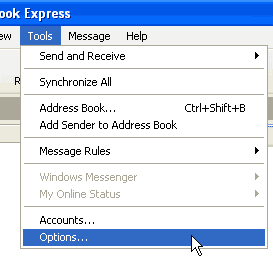
Open the security options window in Outlook Express by clicking on Tools from the top main menu and then Options – refer image below.
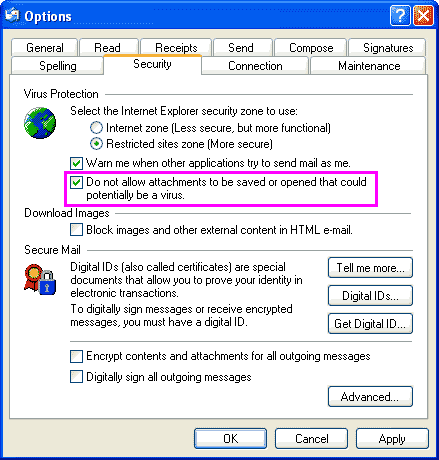
You will find that the “Do not allow attachments to be saved or opened…” (refer image below) will have a check mark in front. Remove this check mark and click on the “Apply” button.
Note: in Outlook Express 6 SP1, the Do not allow attachments to be saved or opened that could potentially be a virus option is enabled so what we have done here is to disable it.
You would now be able to open any email attachment but please do follow the basic rules for opening these files as I have detailed above which are:
- Do not open attachments from unknown senders
- Do not run executable files that you get in emails. Some malicious files are disguised as .txt or likewise. It would be best to save them first on the hard-disk in a temporary directory, run a virus scan and then decide what to do.
- Do not open email attachments just because you have a sudden urge to or are tempted by its file name – we all know what I’m talking about here.
- If receiving attachments is a part of your business (isn’t it for all of us), get a good anti-virus scanner that also has real-time scanning for emails.