Hotmail password is like a key of your account. It’s extremely important that you keep it safe and secure because over time you might store sensitive and vital information in your account. Many security advisors suggest regular changes to login passwords to prevent account hacking and theft of personal and business details.
One quick piece of advice before you continue (and I would be stressing on this point later) – make sure the new password you set up is not something people can guess outright. Also it should be sufficiently complex but not so much that you forget it too. as far as passwords are concerned, there is this fine balance.
Sponsored Links
Why should you change your Hotmail password?
There are many reasons why you would like to change the Hotmail account password.
- The present password is “weak”
If the present password is not very intuitive (such as your spouse name) you should seriously think of changing it to something which cannot be guessed outright in a few tries. Sprinkling the password with a generous helping of upper and lower case alphabet, numbers and symbols will result in a “strong” password. - Your account has been hacked
You may have noticed an untoward activity at your account. Maybe someone has been kind enough to inform you or it’s simply a hunch… whatever! If you feel your Hotmail account has been hacked, you immediately need to change the password (as long as it’s not been modified already – a little scare does help, yeah?) - Password has been leaked
Have you been careless with the password and left it lying around for prying eyes? Well, it’s time to do something about it.
Set a new password for your Hotmail account
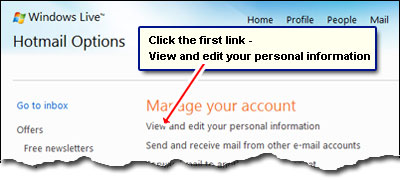
To set a new Hotmail password, login at your account and move to the Settings section (also called “Options“). Click the first link – “View and edit your personal information” – under the Manage your account heading.
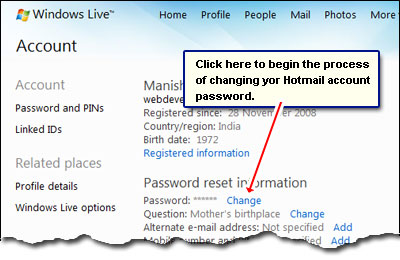
This takes you to your account settings page at Live.com. Now click on the “Change” link beside “Password” under the “Password reset information” heading.
You are all set to assign a new password to your Hotmail account and need to fill only three form fields. The first one asks for the old password (to establish you are indeed the true user) and in the other two you have to type in the new password. Hotmail allows you to have digits and symbols in addition to upper and lower case alphabet so make good use of this. Make the password as complex as possible but not so much that you are not able to recall it. The password strength bar will guide you on the strength of your “creation”. When done, hit the “Save” button.
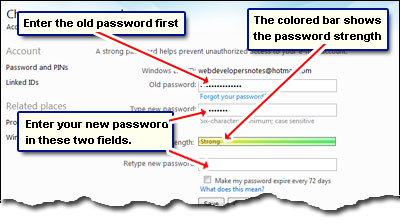
Hotmail has a neat feature of reminding you to change your password every 72 days. Checking the box beside “Make my password expire every 72 days” will result in you getting an alert to modify the account password for added security.
Remember, the security of your Hotmail and Live.com accounts are in your own hands. Creating a not-easy-to-guess password and changing it regularly will help protect you from account hijacking and theft of important information.






Found the answer to the question I had. ty