
Hotmail, like other popular web based email services, lets you create an email signature that is included at the end of messages you send from your account. This feature is found under the Hotmail settings or options section.
An email signature, if you don’t know, is a small bit of information that is attached usually at the bottom of a message. A typical email signature contains the person’s name, contact details (address, phone, fax and mobile numbers, email) and web site address. Also, it is not uncommon to see email signatures being “exploited” for sales, carrying blurbs on ongoing promotions. And in certain email programs (like the popular Outlook Express or Windows Mail) you can even include your business logo in the signature. Anyway, the choice of having a long or a short email signature is entirely up to you.
Sponsored Links
An email signature in Hotmail
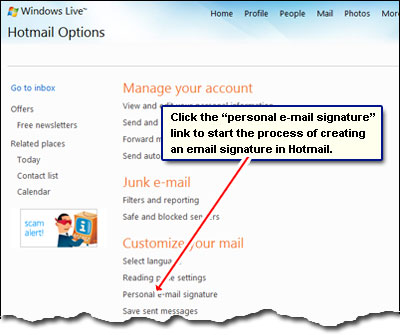
You create an email signature in hotmail via the “Options“. Once in this section, click on the “ Personal e-mail signature” link under the “Customize your mail” heading.
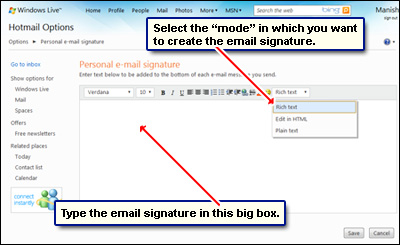
You come to the “Personal e-mail signature” section. You can create a Hotmail email in three ways:
- Rich text: Format the text in the signature, include links and insert emoticons using the options in the toolbar. This is the simplest way to create fancy signatures.
- Edit in HTML: Gives you full control of how the Hotmail email signature should look – obviously, you need to know a little HTML… or cut-paste from an HTML editor.
- Plain text: Vanilla flavoured signatures – simple plain text!
In any case, select your preference and in the big box that’s displayed, start typing the email signature. It will be added at the end of all emails you send from your Hotmail account.
As mentioned above, Hotmail allows you to create really complex email signatures which means, you can embed URLs (web links), emoticons etc. through the “Rich text” interface. And if you know a little HTML, you can have really fancy signatures with images. To know how to use the rich text and HTML editor features, please refer how to make email signature in Hotmail.
A note on images in Hotmail email signatures: You can link to an image stored on your web server or a free image hosting web site.
When satisfied, remember to save the changes.
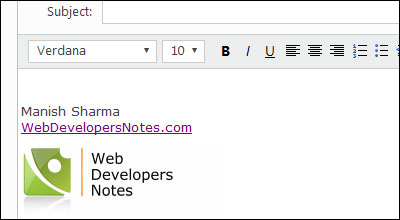
To test the email signature, go back to the inbox and create a new email message. The signature should be right in the big email message box. Here is what I created in a few seconds.
By the way, if you don’t know HTML, you can always use a free WYSIWYG HTML editor to churn up a beautiful looking piece of art that attaches to all outgoing email messages.