Want to inform senders of unavailability? Set an autoreply at your Hotmail account! This “automated vacation replies” feature can be configured quite easily from the Hotmail Settings or Options section and enables you to revert to the sender without any manual intervention.
Thus, once this auto reply is configured, no further action is required from your end – you don’t even need to be logged in at the Hotmail account – and a reply is forwarded to the sender the moment an email is received.
Sponsored Links
Automated vacation replies from Hotmail section
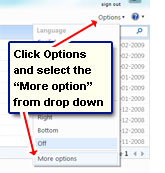 Click on the “Options” link (just below the sign out link) and select “More Options” from the drop down. This takes you to the full Hotmail Options and settings section. You’ll find the “Send automated vacation replies” link under the Manage your account heading – click on it.
If the Hotmail vacation autoreply option is missing from your account, please click that link for details and probable solutions.
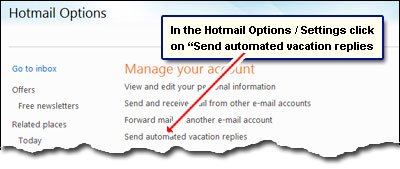
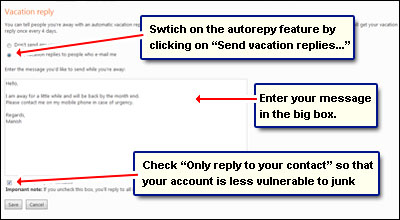
Composing an autoreply in Hotmail
You now come to a Vacation Reply settings window. To activate the feature, click on the radio button in front of “Send vacation replies to people who e-mail me” then enter the message you want to be sent in the big box below. Lastly, you can choose to have the autoreply sent to all incoming emails or only to the mails you get from your contacts. You are not advised to opt for the former option as it will attract junk messages. Anyway, when done, remember to click the “Save” button to confirm the changes you’ve made.
A couple of points: Autoreplies are not sent for incoming junk emails (messages that are made to skip the inbox by Hotmail’s automated junk filter), and rightly so. Also, people who keep sending you emails (even though they know you are away) will get the autoreply message once even 4 days.
If you go back to the “Inbox“, a message at the top informs you that the vacation autoreply is still on. To stop the autoreplies, you need to go back to Hotmail Options and switch off the feature.

Tip: Just as in Hotmail email signatures HTML code is honoured in the vacation autoreply. For instance, you can use the <br> tag to create breaks and start text from a new line, include an image (hosted on a web server – image hosting sites?), fancy styling etc.