
I am new to internet and have just created an email address using your helpful instructions. Thanks a bunch. I wanted to know if it’s possible to access Yahoo email from another computer. Or do I need different emails for different computers? I plan to use internet from my home and office.
Mary Fredrickson
Congratulations on your new email account and glad to know the instructions on how to create a Yahoo ID were useful. You were wise to choose this service provider as I consider Yahoo email the best email in the world.
Sponsored Links
Anyway, coming to your two queries – Yes! You can access Yahoo email from another computer without problems. In fact, the beauty of Yahoo, Hotmail or Gmail email accounts is that they are available from any computer as long as is has a web browser program (almost all computers do) and a live internet connection.
And no, you don’t need to get a new email for each computer you use. A single email address is all you need; at least for the time being when you are new to the web.
Yahoo login page – how to access your email account
To access Yahoo email, you need to go through the Yahoo login page in which you are required to enter the ID and the password of your account; a screenshot of the same is below. You can also take advantage of the “Keep me signed in” feature that will enable your computer to remember these login details and save you the trouble of typing them each time. Please do not check this option when you are accessing Yahoo email account from a public computer such as one in a library or internet cafe.
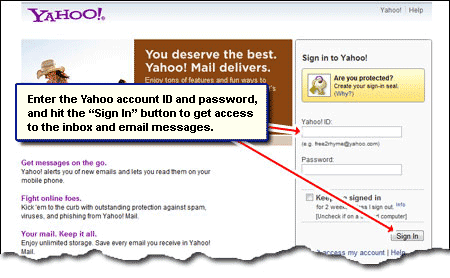
A note for new Yahoo account holders: I recommend not using the “Keep me signed in” feature. Though it offers the convenience of bypassing the login page, you might forget the Yahoo account password if you don’t recall it often. Trust me; I get a lot many emails from desperate users who find themselves in the situation.
How to access Yahoo email account from another computer
Since the webmail interface works on most web browsers you should have no difficulty in accessing Yahoo email account from any other computer whether it runs the popular Windows operating system or a lesser known flavour of Linux. Please follow the steps below:
- Start the web browser program. If you are not sure which one to use, ask the owner of the machine.
- Type in the Yahoo mail sign in page address – Yahoo mail sign in page.
- Enter your Yahoo ID and the account password in the corresponding fields. Make sure “Keep me signed in” is unchecked and hit the sign in button.
Note: If you see someone’s email account instead of the login fields, locate the “sign out” link and click on it. This logs you out of the service and brings you to the Yahoo home page. Now open the sign in page once again. - On successful login, move to the inbox to get the list of emails.
I also suggest spending some time going through the various help and support articles in the Yahoo mail section. I am sure a lot of your queries have already been answered.






Yahoo has blocked me from openig my mail on another computer