
I followed your instructions to copy email from Outlook Express to Windows Live Mail. Everything seemed to work beautifully. I even got a ‘successfully imported’ message. But when I checked the Imported folder there is nothing. The only see a ‘There are no items in this view’ message. Where did I go wrong?
Beverly Wevers
Firstly, the instructions on how to copy Outlook Express email to Windows Live Mail are 100% correct because I have myself used them to move email to a new computer. If you’ve got a ‘successfully imported’ message – rejoice! The email messages have certainly been imported in Windows Live Mail without problem. The point is – where are they?
Sponsored Links
Email has been imported in Windows Live Mail if you get a success message
As mentioned, the email you import in Windows Live Mail will be moved to Imported Folder under the Storage Folders. However, when you click on it you get ‘There are no items in this view’. This is because the ‘view‘ is wrong. Click on the small arrow beside the Imported Folder and move down the directory tree to select and view the imported messages. Ta-da!
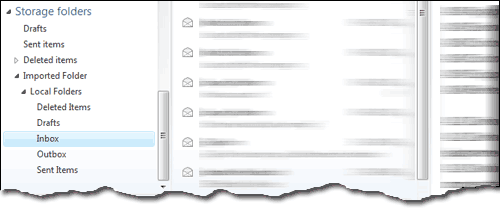
FYI, the above also applies to people who plan to transfer email from Windows Mail Vista to Windows Live Mail and not just Outlook Express.
In the entire process of transferring and importing messages to Windows Live Mail, the most important step is to back up the email client properly. Below are instructions with screenshots:
Conclusion: Sometimes we all miss the obvious. Clicking on the small arrow beside Imported Folder should display the messages that were imported in Windows Live Mail along with their folders. Though this is not very smart GUI design, it does teach us to play a little with the mouse and check the various options and features of the software we are working on.






I get a message on windows live mail that my server has deleted my ability to send or receive emails . . joyce