One of the most common causes of the Hotmail login problem is the loss of password. So if you’ve forgotten this vital piece of information, follow the simple step by step instructions below to reset it and get access to your Hotmail email account.
On a slightly related note. Forgetting the password is common. So once you reset it remember to have the automatic sign in disabled. This way, you would at least have to enter it each time you access Hotmail emails. And make sure the new password you set up isn’t something very simple because this makes the account susceptible to being hacked.
Sponsored Links
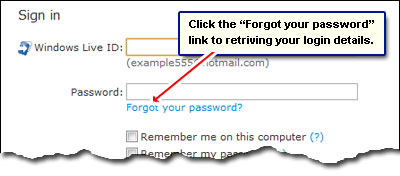
“Forgot your password” link at the Hotmail login page
In the Hotmail sign in section, just below the login fields, is a “Forgot your password?“. Click it to start the process of resetting the account password.
You’ll come to the Reset your password screen – below. Enter your Windows Live ID (the full email address) followed by the wavy characters shown in the image (CAPTCHA) and then click the “Continue” button.
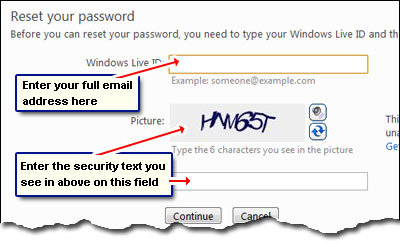
Why do you need to enter the alphabet and numbers in the image? To prove to Hotmail that you are a human. The point is, wavy text can be read and understood by humans but will pose problems for automated programs. “Bad guys” create such programs to gain access or change passwords of email accounts. By the way, if you can’t decipher the characters shown, click on the button with two arrows to refresh the image and get another set. The visually impaired should use the button with the speaker image to hear an audio clip.
Two ways to get hold of your Hotmail password
There are two ways to reset the Hotmail password. The first involves proving your identity by providing the location information and answering the security question you set at the time of creating the Hotmail account. The second way is to have the password reset instructions sent to your alternate email; however, this works only when this information was supplied at the time of making the Hotmail account.
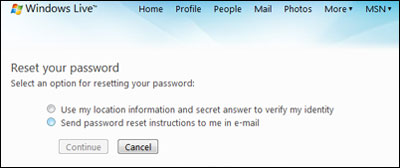
Enter your location information and answer security question
Let us move ahead and try to retrieve the forgotten Hotmail password using the location details and security question.
Select your Country/region from the drop down, enter the postal code, choose the correct State/Territory and type in the answer to the security question shown. Please note, the address fields will differ depending on your geographical location and what you supplied at the time of account creation.
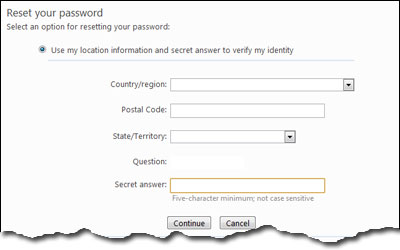
Assuming you’ve been successful in providing Hotmail with the correct answer to the security question and the location information, you’ll arrive at the final screen through which you can change the password.
Answers to common problems
What if you forgot the answer to your security question?
Unfortunately, there is no way to reset the Hotmail account password if you’ve forgotten the answer to the security question too! By the way, the answer is case-insensitive. If you cannot get it right, I am sorry to say but you are out of luck (unless you retrieve password information at your alternate mail address). But having said that, don’t be disheartened so quickly, give it a few tries.
Forgot the location you fed at account creation
Recollect the place you were residing when you created the account. After all, how many locations would you have changed in the course of a few years?