The browser cache, sometimes also referred to as the temporary Internet files folder, contains files from web sites you’ve visited. All modern web browsers maintain a cache of files for one important reason – faster display of web pages the next time you open those web sites.
Thus, instead of being retrieved from the online web server (the computer that hosts the web site) each time, the files are picked from the browser cache (on your computer) which, as you can understand, speeds up the display of the web page.
Sponsored Links
Depending on your browser and the operating system, both the hard disk and RAM are used to store the cache files. By the way, these files are not required from proper functioning of the web browser. You can delete the browser cache anytime you want without any problems. In fact, at times it is advisable to clean up the temporary internet files and we’ll hit on this point later.
What kinds of files are stored in the browser cache?
The browser cache has files from the web sites you’ve opened in the browser. These include entire web pages, images, CSS, audio, video etc. For instance, if you save web pages for offline browsing, all the files would be stored in the browser cache. Also note that if you have multiple browsers installed on your system, each will maintain its own cache and in different locations on the hard disk.
As I mentioned before, the main advantage of maintaining a cache of files is quicker loading of web pages. So when you open a page that already exists in the cache, the browser will, typically, compare the online version with the one on your system. If no changes are found the local copy is displayed.
Controlling the browser cache
All modern web browsers allow you control the size of the cache which can be done via the options and settings. Running short on space? Decrease the size of the cache directory. For instance, in Firefox browser the default size of the cache is 50MB. To change it, click on “Tools” -> “Options” and move to the “Network” tab under the “Advanced” section. Enter a new value in the text field – refer image below.
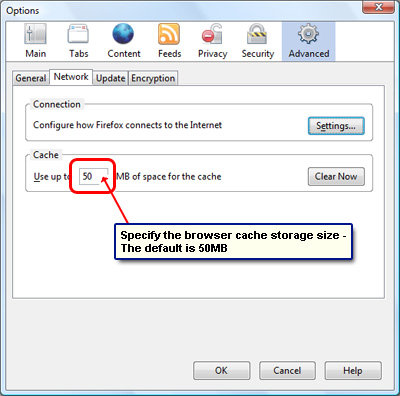
A larger cache that uses more hard disk space will result in pages and files being quickly retrieved and displayed. Also, when you close Firefox, the browser performs a maintenance operation. If this takes a long time, you should consider decreasing the browser cache.
Though, at the time of writing, there is no apparent option in Google Chrome for settings the cache size, a workaround has been found to change the browser cache folder location – you need to run the program with –user-data-dir=[THE DIRECTORY PATH] appended. For details, read the discussion on the Google Chrome support forum.
When should you delete the web browser cache?
- Free up hard disk space: If you are running short of space on the hard disk, you can delete the browser cache and cookies. You may also think of changing the default size of the cache.
- Sometimes, the files in the browser cache might “clash” with their online versions. This is especially true for web pages that require you to sign in such as the Hotmail login page. When faced with a persistent problems, it is advisable to get rid of all the files in the cache.
- At times you might be faced with a stubborn browser that refuses to load the fresher content from the server and continues to dig it up from the cache. This happens frequently with Flash files during the process of testing a web site online. Emptying the browser cache will ensure that the flash movie is loaded from the server.