This article provides instructions on how to create another Yahoo email. Though you can fill up the Yahoo sign up form and create a new Yahoo email address, there is a shorter and, as some would say, a more elegant way of doing this.
In fact, not many people know that the free Yahoo service come with the provision of creating a second email account if you so want. With this method you can also tie up the two email accounts but check them at one place which saves you a bit of time. An additional advantage is, instead of maintaining two different accounts, you have all messages in one.
Sponsored Links
Login at your Yahoo email account
Open the Yahoo login page and sign in at your account. Please note that these instructions have been worked out using the Yahoo Mail Classic version. If you are using All-new Mail interface, I suggest you switch Yahoo mail versions for the time being. Click on the “Options” link and select “More Options“.
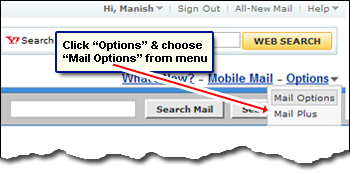
Now click on the “Accounts” link on the left and then the “Add or edit an account” link. What we are doing here is creating another Yahoo email which will be added to the existing account.
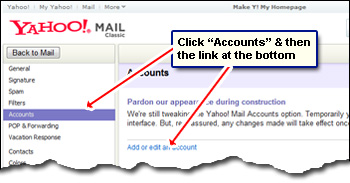
Add another Yahoo ID to the existing Yahoo email address
At the bottom of the page you shall see a “Get Started” link – click on it.
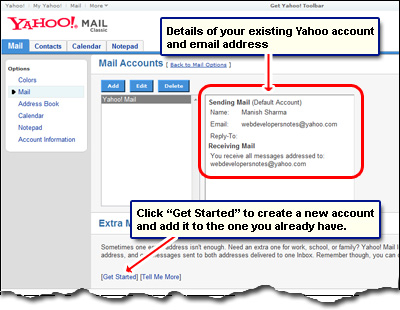
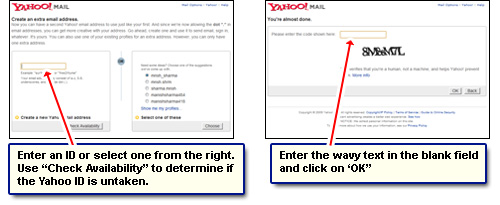
Enter a new ID in the blank text field on the left side or select from one listed on the right – your new yahoo email address will be based on this. If you chose the former path, you would need to check its availability as with any new email address. Assuming you found one to use, click “Continue” to proceed. Now enter the wavy security text and you are done!
Congratulations! You have successfully been able to get a second Yahoo email address. But remember, the two accounts – the new one and the old – are interlinked. People can now send you messages at either of the two Yahoo email addresses.