
Windows Live Mail, the latest email client from Microsoft, allows you to setup multiple accounts including Hotmail. Actually, Hotmail can be added on Windows Live Mail using the http email protocol (default) or the Post Office Protocol – read about the free POP3 access on Hotmail. On this page I’ll walk you through the super easy steps on setting up Hotmail on Windows Live Mail using the default process. For the alternative, check out how to configure Hotmail account on Windows Live Mail using POP3.
Setting up your Hotmail account to Windows Live Mail is quite like the setup process for any new email account for which you need to start with the “Add an E-mail Account” window and this is how you do it.
Sponsored Links
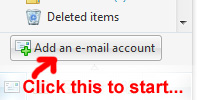
Fire-up Windows Live Mail and click on the “Add an e-mail account” (image below). Alternatively, go to the “Tools” menu and select “Accounts” which displays a pop-up and then hit the “Add” button on this window and click on “E-mail Account”.
Enter your email address, the password, and Display Name. Make sure that “Remember password” is checked unless you want to enter you password each time the program connects to the Hotmail server.
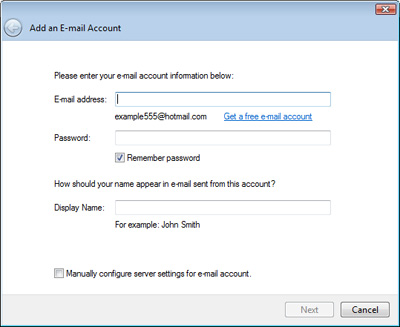
Click on the “Next” button and then the “Finish” button in the following window.
Windows Live Mail will now attempt to connect to the Hotmail server.
In case it fails to connect, type in your password again and retry.
On successful connection, Windows Live Mail will download all emails to your computer. Unless you have changed the layout of the program, it’s going to be similar to what you see below.
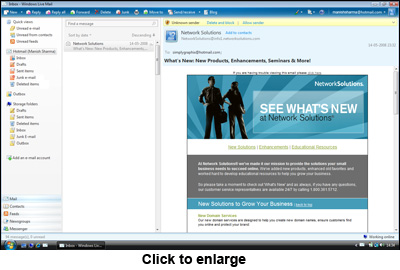
There would be three columns – the first column shows the Quick views links, your newly added Hotmail account in Windows Live Mail, the default folders etc. The second column displays the list of emails and the third will open the contents of the email you have selected.
Your Hotmail account has 5 folders – The Inbox, Drafts, Sent Items, Junk e-mail and Deleted items. The small arrow in front of your Hotmail account name is a toggle switch that lets you view or hides these folders.

Adding multiple accounts to Windows Live Mail
As mentioned in the very beginning, you can configure multiple email accounts in this cool email client. You can add and configure your Gmail account and set up Windows Live Mail for other email accounts from your ISP or web site (as long as they have POP3 or IMAP enabled).