
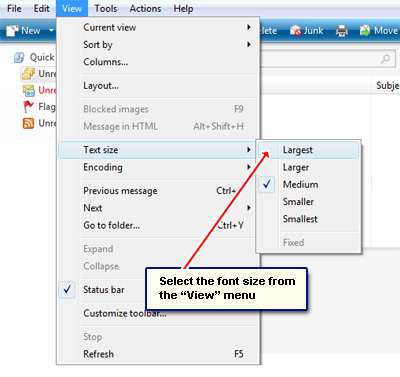
Sandy complains that she doesn’t like Windows Live Mail because the “text appears way too small” for her liking. But that can be fixed quite easily. One can change the font size in the email program via the view settings.
Under the “View” menu is the “Text size” option which lets you pick up one of the five sizes. Obviously, selecting the smallest font size will result in more text being shown at one time so you would not have to scroll so much – especially helpful for those very long emails.
Sponsored Links
Senior citizens or people with visual difficulties might prefer the larger font size in which case, I advise changing the layout so that the panel that displays the actual email message is to the right of the message list. This will effectively give you more vertical area and result in less scrolling.
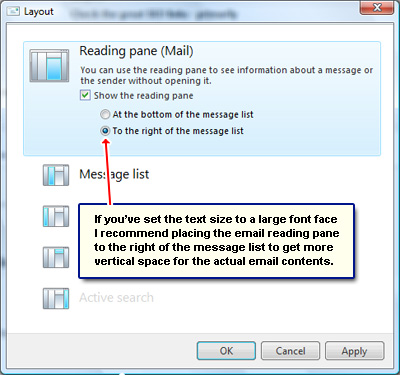
Windows Live Mail email client allows for a good deal of customization of the layout. You can change many things including the size and placement of the different panels. Excepting the pet peeve of many users that Windows Live Mail creates a set of folders for each email account setup in the program, the email client works well and does its job without problems.
But Windows Live Mail doesn’t change the font size…
Emails can be composed in both plain text and HTML formats. If the latter is used, the text size cannot be changed because the formatting is embedded in the message. The only way to increase the font (text) size in Windows Live Mail is to view the message in plain text format. This will remove all the formatting from the HTML email message and display the text in the default font which will probably be fine for most people. If further increase is desired, hold down the Ctrl key on the keyboard and use the mouse scroll wheel or the vertical strip on a touchpad to change the text size.