
Joan asks – “Can you leave a copy of the email on the server? I prefer web-based email, but am wondering if I can use the Windows Live Mail client program to store a backup of my emails?“
The answer to both the questions is yes! You can setup Windows Live Mail or any other competent email client to download email from the server and, thus, create a backup of the messages – that’s the whole purpose of using an email program. You can also configure the settings of the program to leave a copy of the email on the server once it’s downloaded to your computer. Let us see how we can do this in Windows Live Mail.
Sponsored Links
Changing individual email account settings
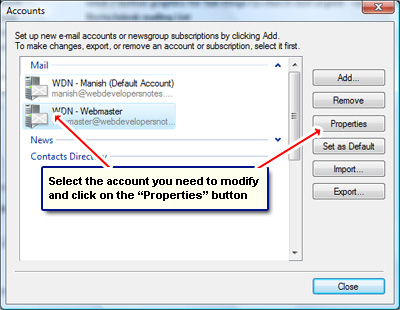
As you probably know, to download messages from an email account you need to setup or create a new account for it in Windows Live Mail. Hence, each email address will have its own account in the email program. If you’ve added multiple accounts, you can list them by going to “Tools” -> “Accounts” which will bring up the “Accounts” pop up window. Click on the account for which you want to change the settings and then hit the “Properties” button.
You will get another pop-up with five tabs. Move to the last one – the “Advanced” tab – and put a checkmark in front of “Leave a copy of messages on server“. You can also fine tune these settings by having the server delete emails after a set number of days or when you delete them from the Deleted Items folder. Click on the Apply button followed by the OK button. That’s it!
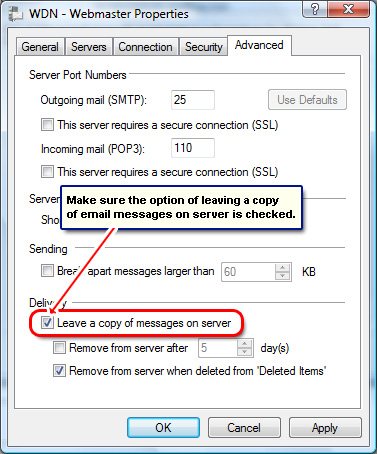
Now whenever you download messages from this account a copy of the email will be retained on the server.
By the way, Windows Live Mail, Windows Mail Vista and Outlook Express will delete the email from the server by default. So you if want all accounts to leave a copy of the email online, you need to modify each one of them.