
I don’t like the plain font when composing messages in Windows Live Mail. In Yahoo I can use a fancier style. How can I change the email font in Windows Live Mail easily? Would also appreciate if you can tell me how to include photos as normal attachments and not in a Photo e-mail.
Haben Girmay
Windows Live Mail is the default email client on the Windows 7 operating system. It can also be downloaded for free and installed on Windows XP and Vista. Since the development and support of both Outlook Express and Windows Mail Vista has been stopped, Microsoft urges all users to upgrade to Windows Live Mail, the latest email program.
Sponsored Links
In Windows Live Mail, emails can be composed and sent in any font you like… as long as it’s installed on your computer. You can not only change the email font type but also the color and size.
How to change the email font, color and size?
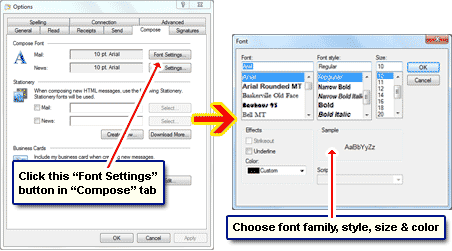
From the top menu, select “Tools” and then “Options“. Move to the “Compose” tab. Click the “Font Settings…” button beside “Mail“. This brings up another pop-up window. The default font in Windows Live Mail is Arial in 10pt size (black color). You can now change the email font to another by selecting it from the first drop down. You can also specify the font style, the size and the color. Once you’ve made your selection, hit the “OK” button in the pop-up to close it. The changes you’ve made will be applied with immediate effect.
Now wasn’t it easy to change the email font, size and color in Windows Live Mail? However, as I’ve learnt from the tons of feedback I receive, many users are stumped at the very first step because they cannot find “Tools” in the top menu. This is because they have the menu bar hidden. To get the Windows Live Mail toolbar, simply select the option to ‘show’ it from the layout icon (Alt + M key combination).
Haben, your question on how to attach photos to an email from Windows Live Mail without the Photo e-mail option has been addressed in another article – please check that link for details.