
Hotmail was launched in July 1996 and has gone over several name changes – at one time Microsoft had decided to drop the Hotmail brand, but then good sense prevailed. Hotmail is now known as Windows Live Hotmail. In this article we shall look at the Hotmail login page and how you can access your emails stored in the online account.
Update: Microsoft has again changed Hotmail. It is now called Outlook.com. This differentiates it from Outlook, the professional email client from the company. However, these similar sounding named and multitudes of products and services are leaving users baffled.
Sponsored Links
Hotmail login page
To load the Hotmail login page, open a browser window and type in www.hotmail.com, mail.live.com or home.live.com – any of these three links will work and show you a page similar to one below. Please note that things keep changing on the internet. If the page you see in your browser is different from the image below, there is no need to fret – simply try to locate the specific sections using – yes – common sense. By the way, if there is a drastic change in the page layout, I would really appreciate you informing me about it via the feedback form at the bottom of the page.
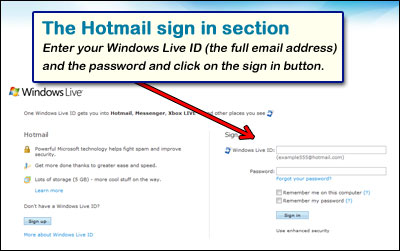
The Hotmail sign in section is on the right. Simply enter your login details – Windows Live ID and the password – and hit the “Sign in” button. Refer Hotmail sign in page, if you are confused or want to know the different options available for the sign in process.
I don’t see the Hotmail login fields!
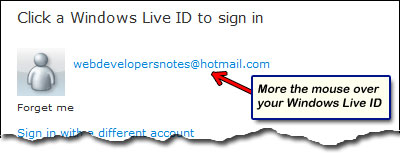
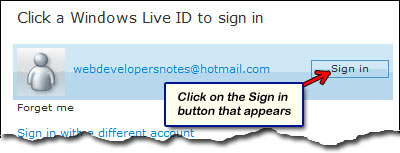
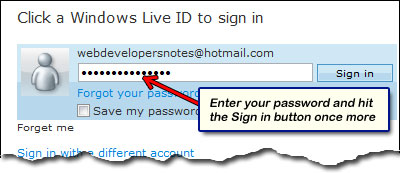
If, on a previous log in, you had checked the “Remember me on this computer” box, Hotmail would probably not show you the login fields and instead display your email address (or Windows Live ID). Move your mouse over it and you’ll get to see the “Sign in” button. Click on it and enter the password in the field that appears. Refer the three images below.
Accessing Hotmail emails
Once you successfully log in at your account, depending on the Hotmail settings, you shall either see either the MSN today page or the Inbox. The MSN Today page is a splash screen with links and images of the latest news and if it’s not something that appeals to you, get rid of it permanently and jump straight to the inbox from next time. To know more refer the page on how to skip the MSN Today page.
Folders that have new unread messages will be set in bold letters with the number of unread messages in parenthesis beside the folder name. In the Inbox, the latest emails will be displayed at the very top. Remember to look in the Junk folder for a message which you were expecting to see in the Inbox. Oftentimes, the Hotmail junk filter traps legitimate emails and marks them as spam or phishing attacks.
Facing problems with Hotmail Sign in
If you are facing problems with Hotmail sign in page, for instance, you’ve forgotten the password, the page doesn’t load or you’re shown an “account closed” message, I suggest you read the pages on Hotmail problems for troubleshooting. More often than not, login problems can quickly be ironed out without much effort; you need to use common-sense and not fret or use choicest of language!





I’ve created a new email with Outlook.com. I didn’t want to but it constantly made it difficult for me to go straight in to my hotmail email account. Now my hotmail emails an contacts has gone. How do I retrieve them?