You can now send SMS from your Gmail account directly to a mobile phone. Unfortunately, at the time of writing, it’s available only for U.S. phones. SMS is actually a Gmail Labs feature and needs to be enabled before you can start using it.
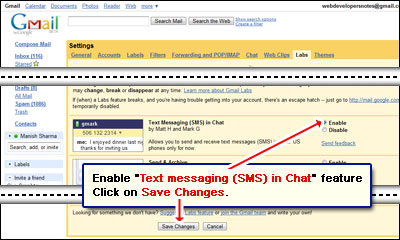
Click on the Settings link (at the top right) and move to the Labs tab. You’ll find “Text messaging (SMS) in Chat” (developed by Matt H. and Mark G.) way down the page so start scrolling. Select the Enable button and save the changes. Your Gmail account will load once again with the Labs feature now activated.
Sponsored Links
How do you send the SMS from Gmail?
Sending SMS from Gmail is really a simple process. Move the mouse cursor over a contact in the Chat window. Click on More (with a small blue downward arrow) and select Send SMS option. Now enter the mobile phone number. The small chat window is launched – you’ll find it at the bottom right in which you type the SMS.
Please note, your contact may be charged for receiving the SMS so I suggest you don’t go overboard.
SMS sent from Gmail chat will come from a 406 area code (US) number. The recipient can use this number to send a reply which gets routed back to Gmail servers to arrive at your chat window. Messages sent and received from different contacts will use different 406 numbers. However, messages from one contact will always use the same number. This means your contacts are assigned individual numbers and you can thus bookmark it in your phone.
Recipients can choose to stop receiving Gmail SMS by replying with the word BLOCK. And if you decide not to receive messages through Gmail from any of your friends, you can reply with STOP.