Once you’ve got the hang of the basics features and functions, it’s time to change the AOL email settings as per your needs. Don’t think this is a useless exercise because it might just save you tons of time and increase productivity.
I shall be providing a quick tour of six sections. Most of these have multiple options. By the way, nothing is written in stone so you can always go back and undo the modifications you had made earlier. And remember, the changes you make will only take effect once you click the “Save” button.
Sponsored Links
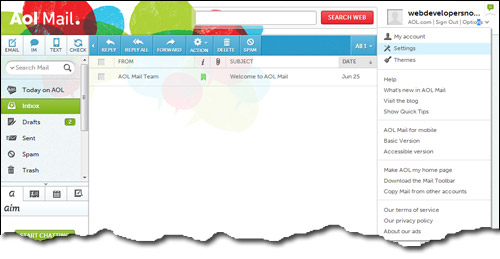
The sleuth of options are located under the aptly named “Settings” section – select it from the “Options” drop down; refer image below.
General AOL email account settings
The first section under Settings. This is where you customize the basics aspects of the AOL email account.
- Today on AOL: Uncheck “Show me Today on AOL when signing in” takes you directly to the inbox – definitely a time saver if you are not interested in news tit-bits and headlines.
- Sender Name Display: Always a good idea to have the names of senders displayed instead of their email addresses.
- Reading: The default selection is fine for most users.
- New Mail: Want to be notified when new email arrives? Choose that option; AOL also helpfully provides a preview.
- Pop-up Windows: Checking “Always write mail in new window” ensures that the list of messages (inbox) is just a click away in the previous window.
- Mail Away Message: This is like an automated vacation reply found on other popular email services such as Hotmail. So if you are away on holiday, notify senders of your absence by either choosing a predefined message or creating your own. By the way, the ‘Mail Away Message’ can be put to other nifty uses such as letting people know of the change in address when relocating.
- Auto Sign Off: You can set up an auto sign off after a stipulated period of time. This is blessing for forgetful people who often use their AOL account on public computers. The feature ensures that the subscriber logs off even if they forget to do so themselves.
- Theme Suggestions: AOL themes let you add that spice to an otherwise drab interface.
- Contacts: Choose how you would want the contacts information to be shown.
Compose settings
- Compose: Are you in the habit of copying email to other people? Choose the option to always have Cc and/or Bcc fields displayed.
- Autosave: This is a great feature and, in my opinion, you should have it enabled at the AOL email account. Why? Because every few minutes it automatically saves messages while you type.
Imagine this situation. You spend tens of minutes in writing an email, attaching images to it, choosing the most suitable language, correcting errors etc. What if you accidentally closed the compose window? All of the hard work would be lost. However, if you enable this functionality, you can quickly get the message from the “Drafts” folder. Awesome, right? - Rich Text / HTML: Who doesn’t want to use rich text formatting nowadays? Also check how to create an AOL email signature. And yes, you can put images in the AOL email signature as well!
Don’t like Arial? There are 9 other fonts to choose from; well, actually 8, as Wingdings will result in utter gibberish. - Display Name: I advise putting your real name in this field because this is what is shown in the recipients inbox.
- Outbound Character set: Leave this as it is unless you know what you’re doing!
- Sending: Yes, AOL has a spell check feature. Automatically adding the email addresses of people in the Contacts list is also a good idea.
AOL Spam Settings
- Spam Filter: Tired of spam? Set the filter to a stricter level. Remember spam filters are simply programs/algorithms and not perfect, so ensure you check the spam folder every few days.
- Sender Filter: create your own black list of senders.
- Content Filter: Not interested in cheap Rolexes? Create a filter with that keyword.
- Blocked Mail: I suggest that you have blocked mail delivered to the spam folder.
IMAP and POP
This section provides the settings for POP and IMAP email protocols. Unless you want to download AOL email to your computer simply ignore all this technical gibberish!
FYI, storing AOL emails on your computer through an email client is not as difficult as it sounds. And you probably already have an email program on your computer which will do this job very well. Also, check AOL incoming and outgoing mail servers for more information.
Filter Settings
AOL email filters will automatically sort incoming email into specified folders and this feature can be a real time saver.