The nifty Opera browser is used only by a small percentage of web surfers but they are fervent supporters of this software. So much so, Opera is one of the most popular web browsers as per my tongue-in-cheek analysis. Like other such programs, Opera too stores a lot of information on your surfing habits; list of web sites you’ve visited in the history, temporary internet files in the cache and the login details (username and password) of online accounts. You can delete the web browser saved files in Opera in a couple of mouse clicks.
Sponsored Links
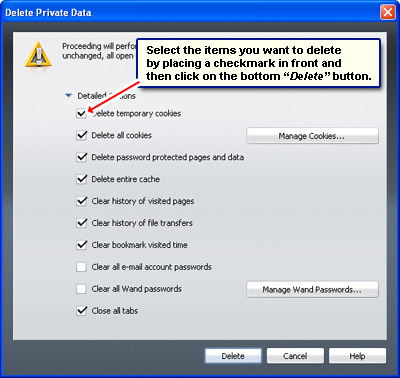
Select the “Delete Private Data” from the “Tools” menu. The pop-up window (below) lets you choose the items you want to clean up. Place a check-mark in front of these and click on the “Delete” button.
Opera and cookies settings
Cookies are small files created by some web sites but stored on your computer’s hard disk. The information stored in cookies helps web site programs in different ways – recognize a visit by you at a later date, keep a track of items you’ve placed in a shopping cart (for online malls and shops) etc.
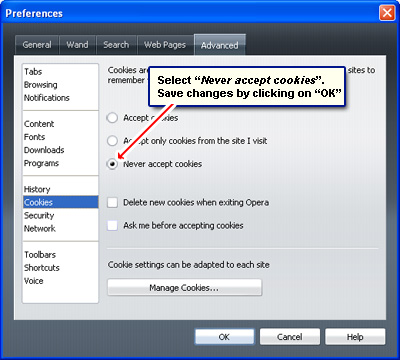
You can, however, opt to not receive cookies but this is not something I would recommend because it hampers a smooth web experience. Any way, if you don’t want the Opera web browser to keep track of your activities, you can quickly turn off cookies in the program.
Under the “Advanced” tab in the “Preferences” window (“Tools” -> “Preferences“), click on “Cookies“, then select “Never accept cookies” and click on the “OK” button.