Web browser history is the list of web sites that you have visited recently. The web page URLs in the history are categorized by date and in most modern browsers you can specify the number of days for which the list is maintained. So if you can’t remember the address of a page you visited yesterday, open the history and locate it quickly.
Why do web browsers maintain a list of recently visited web sites and how is it useful?
Having the browser keep a record of your online activity is a good idea. Consider a scenario when you visited a web page but forgot to note down the address or bookmark it. You can quickly get it from the browsing history, assuming that it’s still in there. Browsers like Google Chrome also provide a search field in which you can type a query and hunt for the elusive web address quickly. This, as you can understand, is a great time saver because you don’t need to go through each link manually.
Sponsored Links
Get the list of web pages in the browser history
You can quickly have the browser show the list of web addresses in the history. Here is how you do it in the five most popular web browsers:
Internet Explorer
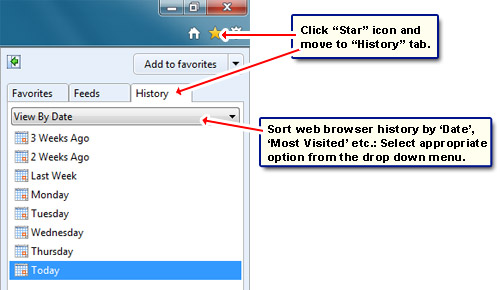
Click on the Favorites “Star” icon and move to the “History” tab. By default the web address in the list will be sorted by date but you can change this by selecting the appropriate option from the drop down. You can also click on the small arrow to the right which opens the web browser history in its own panel. A search feature is also available.
Firefox
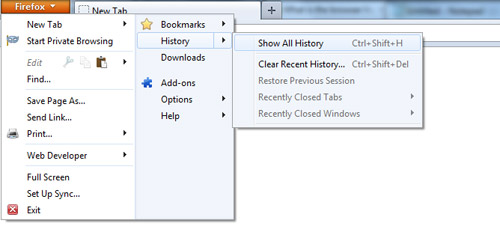
Click the “Firefox” button, choose “History” followed by “Show All History“. A pop-up window displays entire list with a search field. [Keyboard shortcut CTRL-H to get the sidebar and CTRL-SHIFT-H to open the Library pop-up]. To sort this list, click on the “View” button and choose an option.
Google Chrome
Click on the “Wrench” icon and choose “History” [Keyboard shortcut CTRL-H]. The list of all web pages you’ve visited will be displayed in a new tab window with a search field.
Apple Safari
From the small “gear” icon, choose “History” [Keyboard shortcut CTRL-H]. This display all the sites you’ve visited. You can sort this by date (default) or alphabetically. Safari history also shows a small thumbnail which is a great help in recognizing a site in case you forget the address.
Opera
To bring up the list, click the “Opera” button (top-left) and select “History” [Keyboard shortcut CTRL-H to open the sidebar and CTRL-SHIFT-H to display the history in a new tab]. You can search this list or sort it in using various criteria.
Change History settings – specify the number of days for which you want the web browser to maintain the list of web sites
- Internet Explorer: From the “gear” icon, choose “Internet Options“. Under the “General” tab, click the “Settings” button in the Browsing History section. Enter the number of days in the text field. You can also specify the amount of disk space to be used for temporary internet files.
- Apple Safari: Click “gear” icon, select “Preferences” and move to the “General” tab. Now select the option from the “Remove history items” drop down.
- Opera: Click “Opera” button -> “Settings” -> “Preferences“, move to the “Advanced” tab and then click the “History” link to the left. Select the number of web addresses that you want the browser to store.
Delete browser history
- Internet Explorer: Open “Internet Options” from the “gear” icon and go to the “General” tab. Click “Delete” from Browsing history section which displays a pop-up. Choose the appropriate items and get rid of them.
- Firefox: Click “Firefox” button, select “History” -> “Clear Recent History“.
- Google Chrome: Click the Wrench icon and select “History” -> “Clear Browsing Data“.
- Apple Safari: “Gear” icon -> “Preferences” -> “Privacy” tab. Click “Remove All Website Data“. You can also delete individual web sites from the history page (CTRL-H) – right-click and select that option.
- Opera: “Opera” button -> “Settings -> “Delete Private Data“. Now click on the small arrow beside “Detailed Options” and make sure the “Clear history of visited pages” and “Clear history of file transfers” have a checkmark before proceeding to delete the browser history.
And here is why you should delete the web browser history!